
|
Now that we have spoken about some of the Paid Search basics, it's time to look at how a PPC account is structured and what to keep in mind when setting SEM up for the first time.  How to get Started with paid Search 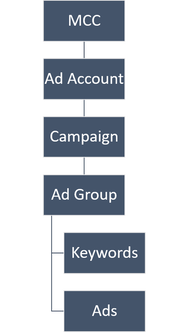 Paid Search Account Structure Paid Search Account Structure First of all you will need to set up an ad account and you should be aware of the general structure of Paid Search accounts. The over-arching level is called the MCC or My Client Center under which you can have several ad accounts (this is handy if you have several brands or if you are an agency who manages Paid Search for several clients). The ad account is where the billing and contact information sits. Each ad account has several campaigns where you can set daily campaign budgets and the objective you want to achieve (online sales or calls or leads, ...). Each campaign has several ad groups. Ad groups are structuring keywords and ads into relevant and common themes. Head over to ads.google.com to set up your Google Ads account if you don't have one yet. Make sure to select the Expert Set-Up. If you want to run Microsoft ads, go to ads.microsoft.com. I recommend to focus on Google Ads for now if it's the first time you are setting up a search campaign, but consider to add Microsoft Ads once you are a little more familiar with how everything works. an Example of what a Real-Life Structure can Look Like Okay, let's assume you are selling organic skincare. You want to show your ads every time someone searches for a keyword that is in line with what you offer. These could be:
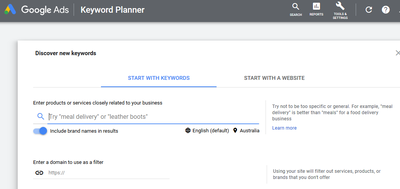
Do Your Keyword Research 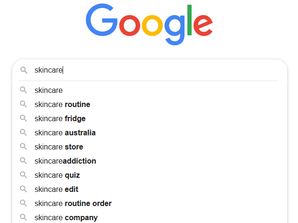 Before you get into the structure it's important to thoroughly research keywords to make sure you are covering what and how consumers are searching for these days. There are several options to get started:
Structure Your Keywords into Common Themes 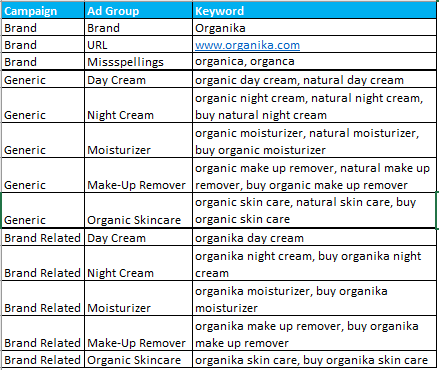 Once you have a keyword list, it's time to arrange the different keywords into common themes. For your organic skincare brand you might want to have the following themes:
What the Heck are Match Types and Why do I need to Care? Match types can be a science for themselves. They control what type of search terms trigger your ad. Broad Match is the default match type when you upload keywords. It is the broadest choice and you need to be careful here as Google will show your ads to someone typing in synonyms, similar words / items, misspellings etc. For example the keyword 'skincare' could trigger your ad on broad match if someone is typing in a 'competitor brand skincare' phrase or something like 'oily skin skin cream'. As relevancy is key you need to make sure that your ad is not showing to any queries that are not relevant to what you do. This is where Negative Keywords come in. These help prevent your ad from showing if someone is typing in a query that is not fully relevant to what you sell. In this example you'd want to exclude the 'competitor brand' or 'oily skin' if you don't offer a solution for this skin type. In terms of the campaign structure you want to keep Broad and Exact Match keywords separate on the campaign level, so you might have a Generic - Broad campaign and a Generic - Exact campaign. In this case you need to make sure to add all exact match keywords as negative keywords to the broad match campaign, so you are not competing against yourself in the auction. It is worth mentioning Broad Match Modifier as this option helps you narrow down your broad match keywords a little at least. By adding a '+' in front of words in your keyword phrase that definitely need to be part of a query for your ad to show are the solution. For example '+skincare' will show when someone types in 'skincare organika', but not if someone types in 'bodycream' or 'skin issues'. Phrase Match is used less, especially in English as it's less relevant. You would use it if you have a phrase as a keyword that would change its meaning if a word gets inserted in between. Your ad will still show if someone ads words before or after the phrase. Exact Match: Only keywords with the exact phrase will show as well as close variants. In the past it was easy only if someone types in 'organic skincare' did your ad show, but these days it includes plurals, close variants, misspellings and sometimes even synonyms. Still, this gives you the most control over your keywords, but it could also mean that you are missing out on showing up for relevant searches if you only used exact match. My recommendation is always to use both Broad Match Modified keywords and Exact Match keywords, separated out in their own campaigns with negative keywords added to the broad match campaign that reflect the exact match campaign. Why? Exact match keywords tend to be more relevant which Google will honour and as such they often have a better quality score and are cheaper. So, be as specific as you can be, but also make sure to go broader to ensure your audience will find you. I'll talk about how to optimize negative keywords and match types in a separate optimization article soon. Once you have built your campaign structure and keyword list, it is time to start writing your ad text or ad creative. There are a few things to keep in mind when it comes to best practice and character restrictions which I will talk about in a separate blog post. Where do I Find further Paid Search Training? A great resource to learn about Google Ads (and pretty much any Google marketing product) is to sign up to Google Skillshop (skillshop.withgoogle.com). It's free and provides detailed training. You can also sign up to the different certifications here. Microsoft has a Learning Lab (learninglab.about.ads.microsoft.com) which gives you a good idea about the Microsoft specifics. If you'd rather get hands-on training from an expert, then speak to me and we can work out a plan. |
 RSS Feed